AI Policy Hallucination: Why Your AI Is Making Up Rules That Don’t Exist
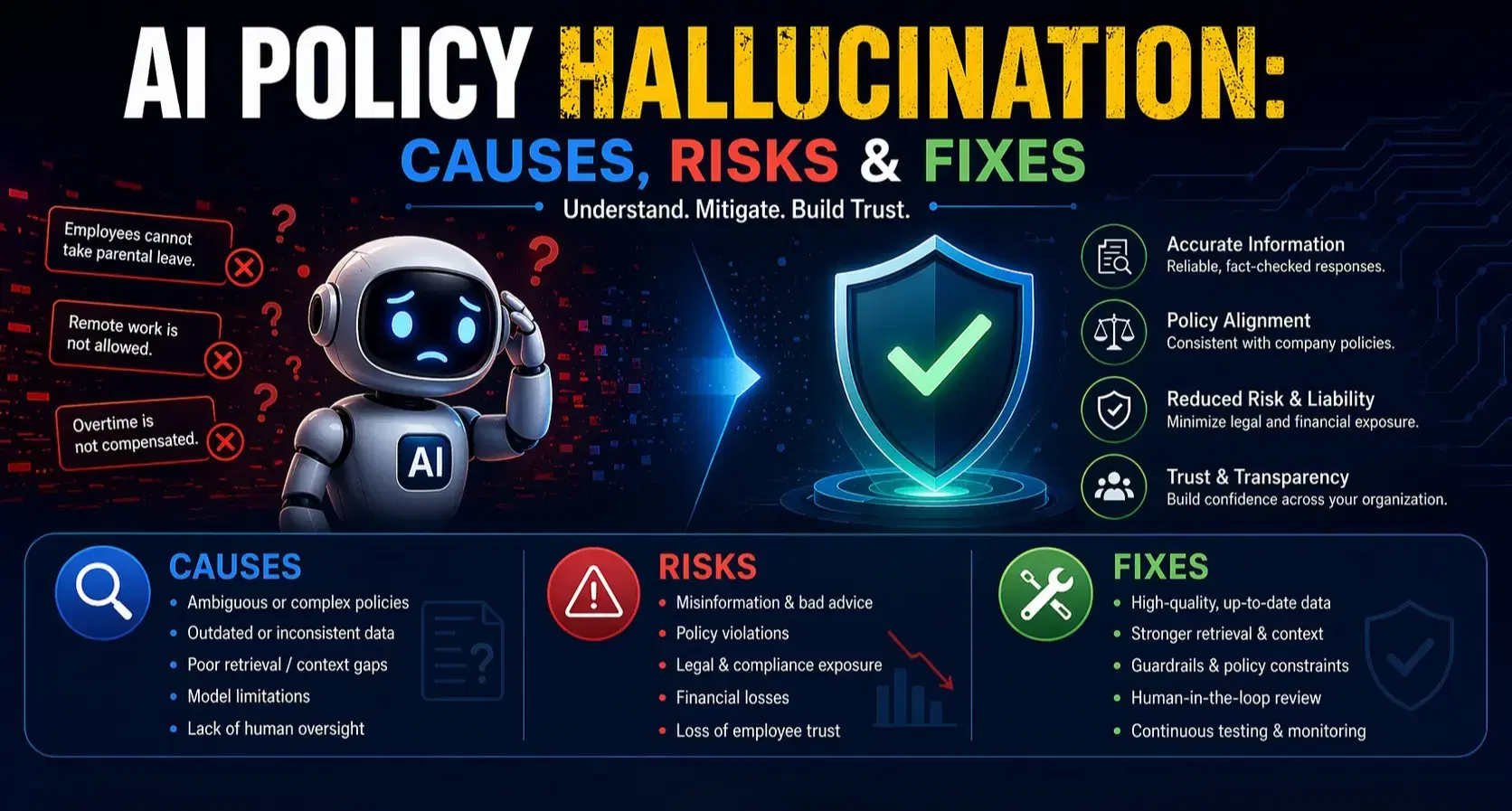
Here’s something most AI users don’t catch until it’s too late: your AI assistant isn’t just capable of making up facts. It also makes up rules.
We’re talking about AI policy constraint hallucination — a specific failure mode where a large language model (LLM) confidently tells you it “can’t” do something, citing a restriction that simply doesn’t exist. You’ve probably seen it. You ask a perfectly reasonable question, and the AI fires back with something like:
“I’m not allowed to answer that due to OpenAI policy 14.2.”
Except there is no “policy 14.2.” The model invented it on the spot.
This isn’t a small quirk. In enterprise settings, this kind of hallucination erodes user trust, creates compliance confusion, and makes AI systems feel unreliable. Let’s break down exactly what’s happening, why it happens, and — most importantly — what you can do about it.
What Is AI Policy Constraint Hallucination?
Policy constraint hallucination is when an AI model invents restrictions, rules, or policies that do not actually exist in its guidelines, system prompt, or operational framework.
It’s one of the lesser-discussed — but more damaging — types of AI hallucination. Most people focus on factual hallucination (the AI making up a fake citation or a nonexistent statistic). That’s a problem too. But at least when a model fabricates a fact, it’s trying to help you. When it fabricates a constraint, it’s actively refusing to help you — based on nothing real.
Here are a few examples of how this plays out in real interactions:
- “I can’t generate that content due to my usage restrictions.” (No such restriction exists for the query asked.)
- “Our policy prohibits sharing that type of information.” (There is no such policy.)
- “I’m not able to process files of that format for legal reasons.” (This is simply untrue.)
The model isn’t lying in a conscious way. It’s doing what LLMs do: predicting what the next most plausible output should be. And sometimes, the “most plausible” response — given what it’s seen during training — is a refusal dressed up in official-sounding language.
Why Do Language Models Invent Policies?
Here’s the thing — understanding why AI models hallucinate constraints gives you real power to prevent them.
1. Training Data Reinforces Cautious Refusals
Research shows that next-token training objectives and common leaderboards reward confident outputs over calibrated uncertainty — so models learn to respond with authority even when they shouldn’t. That same dynamic applies to refusals. If the model has seen thousands of instances of AI systems politely declining requests using policy language, it learns to associate that pattern with “safe” responses.
The result? When a model is uncertain or uncomfortable with a query, it reaches for what it knows: refusal framing. It doesn’t check whether the cited policy actually exists. It just outputs the most statistically probable next token.
2. Ambiguous System Prompts Create Gaps
When an AI system is deployed with a vague or incomplete system prompt, the model has to fill in the blanks. Research shows that AI agents hallucinate when business rules are expressed only in natural language prompts — because the agent sees instructions as context, not hard boundaries. If you tell a model to “be careful with sensitive topics” without specifying what that means, it starts making judgment calls. And those judgment calls often come out as invented constraints.
3. Fine-Tuning Can Overcorrect
A lot of enterprise AI deployments involve fine-tuning models for safety and alignment. That’s a good thing. But overcalibrated safety training can teach a model to refuse broadly rather than thoughtfully. The model learns to pattern-match on words or topics it associates with “restricted” — even when the actual request is perfectly acceptable.
4. Hallucination Is Partly Structural
Let’s be honest: this isn’t just a training problem. Recent studies suggest that hallucinations may not be mere bugs, but signatures of how these machines “think” — and that the capacity to generate divergent or fabricated information is tied to the model’s operational mechanics and its inherent limits in perfectly mapping the vast space of language and knowledge. In other words, some level of hallucination — including policy hallucination — is baked into how LLMs function at a fundamental level.
Why This Matters More Than You Think
You might be thinking: “If the AI says no when it shouldn’t, I’ll just try again.” Fair. But the problem runs deeper than a single failed query.
For enterprise teams, policy hallucination creates real operational drag. If your customer-facing AI chatbot tells users it “can’t help with billing queries due to compliance restrictions” — when no such restriction exists — you’ve just created a support escalation that shouldn’t exist, plus a confused and frustrated customer.
For developers and prompt engineers, it introduces a trust gap. If you can’t tell whether an AI’s refusal is based on a real constraint or a fabricated one, you can’t debug it effectively. Industry estimates suggest AI hallucinations cost businesses billions in losses globally in 2025 — and much of that comes from failed automations, misplaced trust, and broken workflows.
For regulated industries — healthcare, finance, legal — a model that invents compliance language can actually create legal exposure. If an AI tells a user something is “not allowed due to regulatory policy” when it isn’t, that misinformation can have real downstream consequences.
Under the EU AI Act, which entered into force in August 2024, organizations deploying AI systems in high-risk contexts face penalties up to €35 million or 7% of global annual turnover for violations — including failures around transparency and accuracy. A model that fabricates regulatory constraints is a liability risk, not just a user experience problem.
The 3 Fixes for AI Policy Constraint Hallucination
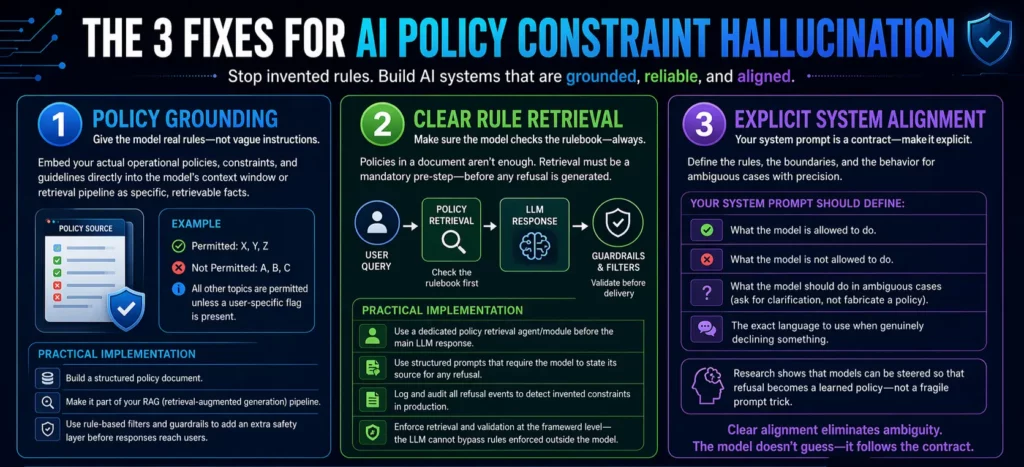
The image that likely brought you here breaks it down simply: policy grounding, clear rule retrieval, and explicit system alignment. Let’s go deeper on each one.
Fix 1: Policy Grounding
The most effective way to stop a model from inventing rules is to give it real ones — in explicit, structured form.
Policy grounding means embedding your actual operational policies, constraints, and guidelines directly into the model’s context window or retrieval pipeline. Not as vague instructions, but as specific, retrievable facts. Instead of saying “be conservative with legal topics,” you write out: “This system is permitted to discuss X, Y, Z. It is not permitted to discuss A, B, C. All other topics are permitted unless a user-specific flag is present.”
When the model has access to a clear, grounded source of policy truth, it doesn’t need to improvise. The invented constraint has no room to exist because the real constraint is already there.
A practical implementation: build a structured policy document, make it part of your RAG (retrieval-augmented generation) pipeline, and configure the model to consult it before generating any refusal. Even with retrieval and good prompting, rule-based filters and guardrails act as an additional layer that checks the model’s output and steps in if something looks off — acting as an automated safety net before responses reach the end user.
Fix 2: Clear Rule Retrieval
Policy grounding sets up the library. Clear rule retrieval makes sure the model actually uses it.
Here’s the catch: just having your policies in a document doesn’t mean the model will consult them reliably. You need a retrieval mechanism that’s triggered before the model generates a refusal — not after. Think of it as a “check the rulebook first” step built into your AI architecture.
The core insight is to use framework-level enforcement to validate calls before execution — because the LLM cannot bypass rules enforced at the framework level. This principle applies equally to constraint handling. If you build policy retrieval as a mandatory pre-step in your AI pipeline, the model can’t skip it and revert to hallucinated constraints.
Practically, this looks like:
- A dedicated policy retrieval agent or module that runs before the main LLM response
- Structured prompts that explicitly ask the model to state its source for any refusal
- Logging and auditing of all refusal events to catch invented constraints in production
The last point is particularly important. If you can’t see when your model is generating fabricated refusals, you can’t fix them.
Fix 3: Explicit System Alignment
This is the foundational layer — and the one most teams underinvest in.
Explicit system alignment means your system prompt is not a vague preamble. It’s a precise contract between you and the model. It states clearly:
- What the model is allowed to do
- What the model is not allowed to do
- What the model should do when it encounters an ambiguous case (hint: ask for clarification, not fabricate a policy)
- The exact language the model should use when genuinely declining something
Anthropic’s research demonstrates how internal concept vectors can be steered so that models learn when not to answer — turning refusal into a learned policy rather than a fragile prompt trick. That’s the goal: refusals that are grounded in real, steerable, auditable policies — not spontaneous confabulations.
When your system prompt handles these cases explicitly, you eliminate the ambiguity that gives policy hallucination room to breathe. The model doesn’t need to guess. It has clear instructions, and it follows them.
What This Looks Like in Practice
Let’s say you’re deploying an AI assistant for a healthcare SaaS platform. Your users are clinical coordinators, and the AI helps with scheduling and documentation queries.
Without explicit system alignment, your model might respond to a query about prescription details with: “I’m unable to provide medical prescriptions due to HIPAA regulations and platform policy.” That’s a fabricated constraint — your platform never said that, and the user wasn’t asking for a prescription, just documentation guidance.
With the three fixes in place:
- Policy grounding means the model knows exactly what your platform permits and restricts — from a structured, verified source.
- Clear rule retrieval means before the model generates any refusal, it checks the policy source and cites it accurately — or asks a clarifying question if the case is genuinely unclear.
- Explicit system alignment means the system prompt has defined how the model handles edge cases, so it never needs to improvise a restriction.
The result: fewer false refusals, better user trust, and a much cleaner audit trail for compliance.
The Bigger Picture: AI You Can Actually Trust
Policy constraint hallucination is a symptom of a broader challenge in AI deployment. Most teams focus on making their AI capable. Far fewer focus on making it honest about its limits.
The real question is: can you trust your AI to tell you the truth — not just about the world, but about itself? Can it accurately report what it can and can’t do, based on real constraints rather than invented ones?
That kind of trustworthy AI doesn’t happen by accident. It’s built through deliberate system design: grounded policies, intelligent retrieval, and alignment that’s explicit enough to hold up under real-world pressure.
At Ai Ranking, this is exactly the kind of AI deployment challenge we help businesses navigate. If your AI is generating refusals you didn’t authorize, or citing policies that don’t exist, it’s not just a prompt problem — it’s an architecture problem. And it’s fixable.
Ready to Build AI Systems That Don’t Make Up Rules?
If you’re scaling AI in your business and want systems that are reliable, transparent, and aligned with your actual policies — let’s talk. Ai Ranking helps enterprise teams design and deploy AI architectures that perform in the real world, not just in demos.
Frequently Asked Questions
1. What is policy constraint hallucination in AI?
Policy constraint hallucination is when an AI model invents restrictions, rules, or policies that don't actually exist. Instead of refusing a request because of a real guideline, the model fabricates a policy-sounding reason to decline — even when the request is perfectly valid.
2. Why does AI make up rules it doesn't have?
LLMs are trained to predict the most statistically likely next output. When uncertain or encountering an unfamiliar query, the model may pattern-match to "refusal language" it has seen during training generating a fake policy as a plausible-sounding response. It's not intentional; it's a feature of how probabilistic language models work.
3. How is policy hallucination different from factual hallucination?
Factual hallucination is when an AI invents false information (a fake statistic, a nonexistent person). Policy hallucination is when an AI invents false restrictions (a rule or guideline that doesn't exist). Both are harmful, but policy hallucination is uniquely problematic because it results in the AI refusing to help — based on nothing real.
4. Can policy constraint hallucination be fully eliminated?
Not entirely. Research published in early 2024 (arXiv) confirmed that some degree of hallucination is mathematically inevitable given how LLMs function. However, with proper policy grounding, retrieval mechanisms, and system alignment, it can be dramatically reduced — to the point where it rarely affects production systems.
5. What is policy grounding in AI systems?
Policy grounding means embedding your real operational policies and constraints directly into the AI's context or retrieval pipeline in structured, explicit form. This gives the model a verified source of policy truth to reference — eliminating the need to improvise restrictions.
6. How do I know if my AI is generating hallucinated constraints?
The clearest signs: refusals that cite specific policy numbers or regulatory codes you don't recognize, refusals that change between similar queries without obvious reason, or refusals that block requests your actual policy explicitly permits. Logging all refusal events and auditing them regularly is the most reliable detection method.
7. What is explicit system alignment for AI?
Explicit system alignment means writing your AI system prompt as a precise contract — not a vague preamble. It clearly states what the model is permitted to do, what it's not permitted to do, and exactly how it should handle ambiguous cases. This removes the ambiguity that causes policy hallucination.
8. Does RAG help prevent AI policy hallucination?
Yes, retrieval-augmented generation (RAG) is one of the most effective tools for reducing policy hallucination. By configuring the AI to retrieve and cite real policy documents before generating any refusal, you give the model verified ground truth to work from — instead of forcing it to guess.
9. Is AI policy hallucination a legal or compliance risk?
It can be. In regulated industries like healthcare, finance, and legal services, an AI that invents compliance restrictions — or falsely claims something is prohibited — can mislead users and create legal exposure. Under frameworks like the EU AI Act, organizations deploying AI in high-risk contexts are required to maintain transparency and accuracy in AI outputs.
10. How do AI guardrails help with constraint hallucination?
Guardrails are rule-based filters or automated checks that intercept the model's output before it reaches the user. They can flag refusals that don't match real policy, block invented compliance language, and route ambiguous cases to human review. Combined with good system alignment, guardrails create a safety net that prevents false refusals from reaching end users.

Why Leadership Must Drive AI Agent Adoption Across the Organization
Here is a question worth sitting with: Your company just spent six figures on AI tools. Your IT team built the pilots. Your vendor gave three onboarding sessions. And yet, six months in, adoption across the organization is hovering somewhere between “low” and “invisible.”
Sound familiar?
This is not a technology problem. It is not a budget problem. And it is definitely not a problem your IT team can fix on their own.
When leadership isn’t driving AI adoption, everything else you do to push it forward is just noise. Teams take their cues from the top. If they don’t see their managers, directors, and executives actively using AI, talking about AI, and holding people accountable to AI outcomes, then AI becomes just another initiative that will quietly fade away after the next quarterly review.
The data backs this up. McKinsey’s 2025 Workplace AI report surveyed 3,613 employees and 238 C-level executives and found that employees are ready for AI, but leaders are not steering fast enough. The biggest barrier to success is leadership.
That is not a small finding. That is the finding. And if you’re a CEO, CTO, or senior business leader, this one is squarely on your desk.
Why Leadership Isn’t Driving AI Adoption Is the Real Bottleneck
Most organizations frame AI adoption as a rollout problem. They build a roadmap, pick a vendor, set up training sessions, and wait for adoption to happen. It doesn’t. Because adoption isn’t a rollout problem. It’s a culture problem, and culture is set by leaders.
Think about how any new behavior spreads inside a company. People don’t change how they work because they attended a webinar. They change because they see their peers doing things differently, because their manager asks them different questions, and because their performance is measured against different outcomes. None of that happens without leadership actively driving it.
When executives treat AI as someone else’s responsibility, a few predictable things occur. Teams see AI as optional. Middle managers don’t prioritize it. Budgets get questioned at renewal time. And the early adopters who were genuinely excited burn out trying to evangelize uphill without any support.
McKinsey’s research shows that AI high performers are three times more likely to have senior leaders who demonstrate ownership of and commitment to their AI initiatives. Those same leaders actively use AI themselves and role-model the behavior they want to see across the organization.
That three-times multiplier isn’t marginal. It’s the difference between companies that are genuinely transforming and companies that are running expensive pilots forever.
What the Numbers Actually Say About Leadership and AI Success

The statistics here are sobering, and leaders need to face them honestly.
According to McKinsey’s 2025 State of AI report, 88% of organizations reported regular AI use in at least one business function in 2025, compared with 78% a year earlier. But only about one-third have begun scaling AI programs across the organization. The gap between “we’re using AI somewhere” and “AI is changing how we operate” is enormous, and leadership behavior sits right in the middle of it.
A 2025 report from WRITER, which surveyed 1,600 knowledge workers including 800 C-suite executives, found that more than one in three executives describe their generative AI adoption as a “massive disappointment.” Two-thirds of C-suite leaders reported tension between IT teams and other business units around AI implementation.
Here’s the number that should alarm every board room: Only 28% of organizations report that their CEO takes direct responsibility for AI governance and oversight. Yet the companies where the CEO is directly involved in AI governance report meaningfully higher business impact from their AI investments.
The math is simple. When the CEO owns it, it gets resourced, prioritized, and measured. When AI is delegated to a single team, it gets stuck.
McKinsey’s March 2025 report, “How Organizations Are Rewiring to Capture Value,” reinforces this directly: only 28% of respondents whose organizations use AI say their CEO oversees AI governance, and CEO oversight is strongly correlated with higher self-reported bottom-line impact.
The IBM Watson Story: A Masterclass in What Happens Without Real Governance
No case study on AI adoption failure is more instructive than the story of IBM Watson for Oncology.
IBM positioned Watson Health as a moonshot. The technology would democratize elite oncology expertise, helping clinicians around the world make better cancer treatment decisions. IBM committed billions of dollars. The marketing was confident. The promise was enormous.
What actually happened was a governance and leadership failure at scale.
The system was developed with training data curated by a small group of physicians using hypothetical patient cases, not real clinical data. When hospitals tried to deploy it in the real world, the recommendations were often inconsistent with national treatment guidelines. One physician at a Florida hospital told IBM executives the system was “worthless” for most cases, and that the hospital had bought it largely for marketing purposes.
When MD Anderson Cancer Center, one of Watson’s most prominent partners, transitioned from its legacy EHR system to Epic Systems, Watson couldn’t access live patient data. A $62 million investment became, in the words of one review, a “custom demo.”
By 2022, IBM announced the sale of Watson Health’s healthcare data and analytics assets to Francisco Partners. Financial terms were not officially disclosed, though reports placed the deal at more than $1 billion, a figure widely understood to represent a fraction of the total capital invested in acquisitions, development, and deployment across the life of the program.
The core failure wasn’t the technology itself. As researchers and analysts have since noted, the problem was structural and organizational. IBM’s leadership scaled the product before the conditions for it to work were established. There was no rigorous governance to catch the gap between what was being promised externally and what was actually possible internally. Clinical experts weren’t embedded deeply enough. The business case was built on narrative rather than evidence.
This is precisely what happens when AI adoption is treated as a product launch rather than as an organization-wide capability change that requires sustained leadership ownership at every level.
Source: Henrico Dolfing Case Study Analysis, December 2024
What Leaders Actually Need to Do Differently
The answer to “leadership isn’t driving AI adoption” isn’t to send another memo or mandate a new tool. It is to change behavior, specifically leadership behavior, in visible and consistent ways.
Here’s what that looks like in practice.
Use the tools publicly. When a CEO shares that they used AI to prepare for a board meeting, or a VP mentions in a team call that they ran a prompt to summarize competitive research, those small moments signal that AI is real, not aspirational. Visibility matters enormously.
Ask AI-related questions in reviews. If the only metrics being reviewed are the same ones from two years ago, nothing changes. Leaders who ask “how did we use AI to get this result?” or “where did AI save us time this quarter?” are reshaping what the team pays attention to.
Assign explicit ownership. Not a committee. Not a shared responsibility. One named person whose job includes making AI adoption work, with a budget, a timeline, and reporting lines directly into leadership. As our analysis of why leadership must drive AI agent adoption shows, the moment there is no single owner, accountability evaporates.
Remove the barriers teams face. Most frontline employees aren’t anti-AI. They’re time-poor, risk-averse, and waiting for permission. Leaders need to create psychological safety around experimentation, reduce the bureaucratic friction around tool access, and make it easy to try things without fear of looking incompetent.
Tie AI outcomes to performance conversations. What gets measured gets done. When teams know that AI capability building is part of how they are evaluated, they prioritize it.
The Readiness Problem Leaders Keep Ignoring
Leadership behavior is only one part of the equation. Even the most committed executive can’t drive adoption if the organization’s infrastructure isn’t ready for AI agents to work.
This is a critical point that gets skipped in most leadership conversations about AI.
Your AI agents are only as reliable as the data and systems they operate in. If knowledge is scattered across tools and teams, agents won’t find what they need. We cover this challenge in depth in our piece on why scattered knowledge is silently sabotaging your AI, and in our blog on scattered knowledge and AI agent readiness.
If your documented processes don’t reflect how work actually happens, agents will make decisions based on outdated or wrong information. This is explored in our piece on what happens when your documentation lies, and in our undocumented workflows blog.
If different teams are working from different versions of the same data, the conflict kills AI decision quality before it even starts. Our article on multiple versions of truth and why conflicting data kills your AI makes this concrete, and our blog on multiple versions of truth walks through the fix.
If agents can’t access real-time data, every decision they make is already stale. We break this down in why real-time data access is the hidden reason your AI agents stall and in our blog on AI agents failing without real-time data access.
And if there are no approval or review layers, no metrics for performance, and security systems that were designed for humans rather than autonomous agents, you’re not just slowing adoption down. You’re creating risk. These exact gaps are covered in our deep dives on AI agents with no approval or review layer, security built only for humans, and no metrics for AI performance.
Leaders who genuinely want to drive AI adoption have to ask: are we actually ready for agents to operate here? Or are we trying to drive on a road that hasn’t been built yet?
The Leadership Gap vs. The Readiness Gap: A Practical Framework
Understanding both gaps helps you prioritize the right interventions. Here is a simple way to think about where your organization stands.
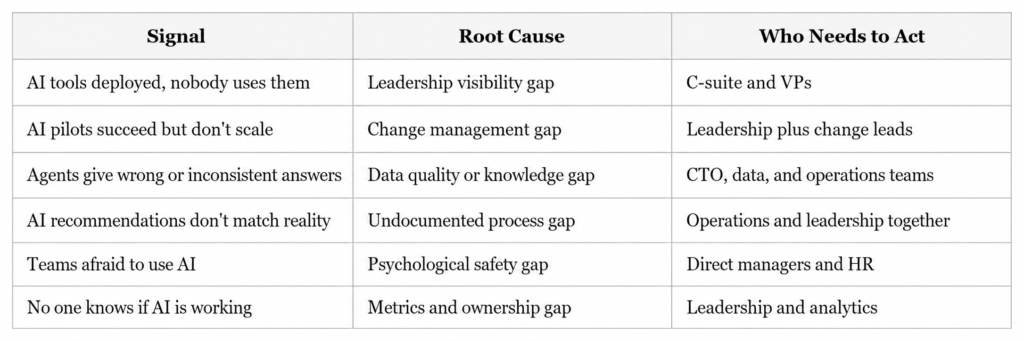
Most organizations have problems in multiple columns at once. The common thread is that none of these get fixed without leadership actively identifying the problem, naming it publicly, and committing resources to solve it.
Three Questions Every Leadership Team Should Answer This Quarter
If you’re serious about closing the gap between “we have AI” and “AI is working for us,” start with these three questions in your next leadership session.
One: Where is AI visibly showing up in our leadership behavior? Not in slides. In actual day-to-day decisions, communications, and reviews. If the honest answer is “not really anywhere,” that’s where to start.
Two: Who owns AI outcomes across this organization? Not IT. Not a vendor. A named individual with authority, accountability, and a direct line to leadership. If you can’t answer this in thirty seconds, ownership doesn’t exist.
Three: What does success look like in ninety days? Not annual ROI projections. A concrete, measurable outcome that proves the investment is moving in the right direction. If there’s no near-term success metric, there’s no accountability loop.
These aren’t complicated questions. But they require an honest conversation that many leadership teams keep avoiding because they’re busy and because the status quo feels comfortable.
The status quo, meanwhile, is getting more expensive every quarter.
What High-Performing Organizations Do Differently
McKinsey’s research identifies a consistent pattern among AI high performers. They’re not necessarily the companies with the biggest budgets or the most sophisticated technology. They’re the companies where senior leaders demonstrate visible ownership of AI initiatives, actively use AI themselves, and role-model the adoption behavior they want to see.
These organizations treat AI not as an IT capability but as a business capability. The difference in framing changes everything: who owns it, how it’s resourced, how progress is measured, and how it’s talked about internally.
They also do something that most organizations skip. They redesign workflows rather than bolting AI onto existing ones. Leaders at these companies are willing to ask harder questions about how work actually flows, where decisions get made, and what needs to change structurally for AI to deliver real value.
That kind of organizational introspection doesn’t happen at the team level. It requires leadership to drive it.
Conclusion: Adoption Starts at the Top, Not at the Tool
There’s a version of this story that ends well, and a version that doesn’t. The difference isn’t the quality of the AI tools, the size of the implementation budget, or the enthusiasm of the early adopters.
The difference is whether your leaders treat AI as someone else’s problem or as their own.
When leadership isn’t driving AI adoption, you get pilots without scale, investments without returns, and teams that quietly go back to doing things the way they always have. When leadership does drive it, you get the 3x performance multiplier McKinsey observed. You get teams that feel permission and urgency to change. You get an organization that actually transforms.
The infographic above puts it plainly: “If leaders don’t actively use AI, teams won’t prioritize it. Adoption starts at the top.” That’s not a motivational phrase. That is an operational truth backed by the data.
Your next move is not another pilot. It’s a leadership conversation about ownership, visibility, and accountability. Start there, and everything else becomes easier.
Ready to Assess Your AI Agent Readiness?
At Ysquare Technology, we help enterprise and growth-stage companies identify exactly where their AI adoption is breaking down and what leadership, data, and infrastructure changes are needed to fix it.
If your AI investments aren’t delivering what you expected, the problem is almost certainly upstream of the technology. Let’s find it together.
Connect with us on LinkedIn or visit www.ysquaretechnology.com to start the conversation.
Read More

Ysquare Technology
01/06/2026

AI Performance Metrics: Why Your AI Is Losing Money
Most leaders think deploying AI is the hard part. It is not. Running AI without any way to measure whether it is actually working, that is the hard part. And right now, a startling number of organizations are doing exactly that.
Here is what most people miss: deploying an AI agent without performance metrics is not neutral. It is a slow bleed. Every day the system runs without measurement, errors go undetected, costs drift upward, and the gap between what you expected and what you are getting quietly widens. By the time someone notices, the damage is already embedded in your operations.
This article is for CEOs, CTOs, and technology leaders who are serious about getting real business value from AI, not just deploying it and hoping for the best. If your AI agents are live but you cannot answer the question “Is this working and how do we know?”, keep reading. We are going to change that.
Why “No Metrics for AI Performance” Is Sign Number Eight on the AI Readiness Watchlist
When we talk about the 15 signs your organization is not ready for AI agents, the absence of AI performance metrics sits at number eight for a reason. It sits squarely in the middle because it is the hinge. Everything before it, from scattered knowledge and undocumented workflows to poor data quality and no approval layers, creates conditions where AI fails. But without measurement, you never know which of those failures is happening, or how badly.
The phrase “what gets measured gets optimized” sounds like a motivational poster. In AI operations, however, it is a survival principle. Without a measurement layer, your AI agent has no feedback mechanism. It cannot improve because nothing tells it, or you, when it is wrong. Mistakes that a human reviewer would catch in a traditional workflow scale silently through automated systems until they surface as a business problem rather than an AI problem.
This is the real danger. Not that your AI will fail dramatically on day one. But that it will fail quietly, incrementally, across thousands of interactions, and you will have no idea until the downstream consequences surface in your P&L, your customer satisfaction scores, or your compliance audit.
What the Data Actually Says About AI Measurement
The numbers here are genuinely alarming. Moreover, they deserve to be seen clearly rather than buried in footnotes.
McKinsey’s research confirms that fewer than 20% of organizations track well-defined KPIs for their GenAI solutions. That means more than four out of five organizations are running AI without a structured measurement framework. According to the same research, scaling AI without defined metrics is consistently cited as the primary reason AI programs stall out before they deliver value.
Gartner’s AI Maturity Survey found that only 63% of high-maturity organizations, the ones already considered advanced in AI adoption, run financial risk analysis, ROI analysis, and measure customer impact in any structured way. Think about what that means for organizations still in earlier stages of the journey.
Deloitte’s State of GenAI 2024 report found that 41% of business leaders openly admit they struggle to measure AI’s impact on their operations. IBM’s ROI of AI Report, conducted by Morning Consult, put the positive ROI figure at just 47%. More than half of companies investing in AI cannot confirm they are seeing returns.
McKinsey’s Superagency in the Workplace report found that 92% of companies plan to increase their AI investments over the next three years, while only 1% of leaders describe their companies as mature in AI deployment. The message is clear: AI investment is accelerating, but AI operating maturity is still far behind.
This is not an AI problem. It is a management problem. And it is one that can be fixed.
What “No AI Performance Metrics” Actually Looks Like Inside an Organization
It rarely looks like chaos. That is part of what makes it so hard to catch. Here is what it actually looks like day to day.
Your dashboards show activity, not outcomes. You can see how many tasks the AI agent processed, how many queries it responded to, how many workflows it touched. What the dashboard does not show is whether any of that activity produced a better result than what you had before. Volume is not value.
Improvement happens by accident when it happens at all. Without baselines and benchmarks, you have no way to distinguish a genuine performance gain from random variance. Your AI might get better over time, or it might quietly degrade. You will have no way to tell the difference until something breaks loudly enough to notice.
The AI team and the business team are measuring different things. Engineers track uptime, latency, and model accuracy. Business leaders track revenue, customer satisfaction, and operational costs. With no shared measurement framework, these two groups are essentially working on different problems and calling them the same project.
Errors compound before anyone catches them. This connects directly to the risk of running AI without an approval or review layer in your workflows. If you want to understand how unreviewed AI outputs scale into operational risk, the breakdown of what happens when no approval or review layer exists in your AI setup makes the connection concrete. Without metrics, you cannot see errors accumulating. Without a review layer, you cannot stop them from spreading.
The IBM and MD Anderson Case Study: A Sixty-Two-Million-Dollar Lesson in Missing Metrics
When people ask for a real-world example of what it costs to run AI without a clear measurement and validation framework, this is the one that belongs in every boardroom conversation.
IBM and MD Anderson Cancer Center partnered to build the Oncology Expert Advisor, a Watson-powered advisory tool designed to assist oncologists in clinical decision-making. The project was well-funded, medically ambitious, and backed by genuine intent to improve patient care. A prototype was tested in the leukemia department.
MD Anderson cancelled the project in 2016 after spending approximately sixty-two million dollars. As reported by IEEE Spectrum, the system never became a commercial product. The project ran into serious difficulties with the realities of clinical data, including the complexity of electronic health records, validation challenges, and the absence of clear performance checkpoints that would have allowed teams to catch integration problems early and course-correct before costs escalated.
The lesson is not that AI cannot work in healthcare. It absolutely can, and does. The lesson is that high-stakes AI needs clear success criteria, clinical validation standards, integration readiness checks, and measurable performance milestones before it moves toward production deployment. Without those checkpoints built in from the start, you have no mechanism to identify failure until the budget is already spent.
Source: IEEE Spectrum, “IBM Watson, Heal Thyself: How IBM Overpromised and Underdelivered on AI Health Care.”
The AI Performance Metrics That Actually Move the Needle
Here is where most measurement frameworks go wrong. They measure what is easy to pull from a system log rather than what tells you whether the AI is creating business value. Let us fix that.
Accuracy and Quality Metrics
First, you need to know whether the AI is producing correct, useful outputs. The most practical ones to track are task completion rate (did the agent finish what it was asked to do), recommendation acceptance rate (when the AI suggests something, how often do humans agree it was right), and error rate per thousand interactions. Furthermore, if your AI is producing outputs that humans routinely override or correct, that pattern is itself a critical data point.
Efficiency Metrics
Beyond accuracy, efficiency metrics connect AI activity directly to cost and speed. Compare average handling time before and after AI deployment on the same process. Track cost per task completed. Measure the ratio of AI-resolved interactions to human-escalated ones. As a result, you will know quickly whether the AI is automating volume while also increasing cost per unit, which happens more often than most leaders expect.
Business Impact Metrics
These are, ultimately, the ones that justify the budget conversation. How much revenue has AI-assisted decisions influenced? What has happened to customer satisfaction scores in workflows the AI now touches? Are operational costs in targeted areas trending down or up? In short, these metrics transform AI from an IT project into a business strategy.
Risk and Safety Metrics
Finally, risk and safety metrics are consistently the most overlooked category. Track the rate at which AI-generated outputs require human correction after the fact. Monitor escalation volumes for signals that the AI receives requests outside its reliable range. Run regular compliance checks on AI-involved decisions. These metrics are your early warning system, and without them, you are operating blind.
If your data quality is inconsistent across systems, all of these metrics will be unreliable at the source. This is why addressing multiple versions of truth in your data is not a separate workstream from building an AI measurement framework. They are the same problem looked at from two angles.
Why Most AI Measurement Frameworks Fail Before They Start
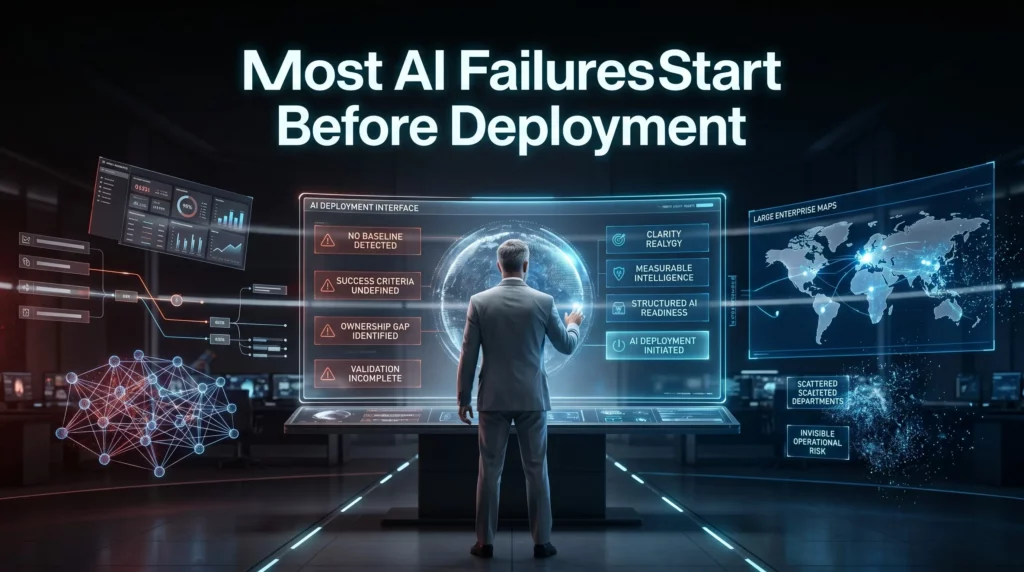
Here is the catch that most implementation guides skip over. Building a metrics framework after deployment is significantly harder than building it before. And most organizations try to do exactly that.
By the time you realize you need measurement, your AI has already been running for weeks or months. You have no baseline to compare against. The teams closest to the pre-AI process have moved on to other priorities. Moreover, real-world inputs have already shaped the AI’s behavior in ways that teams never benchmarked, so there is nothing meaningful to measure improvement against.
This is why the measurement conversation needs to happen before go-live, not after. When you design the AI agent’s workflow, that is when you define success. What does this agent need to accomplish for this deployment to be worthwhile? Write it down in specific, measurable terms. That sentence becomes your first performance metric.
The other failure pattern is assigning measurement responsibility to nobody in particular. Metrics without owners are decoration. Someone on your team needs to own each KPI, report on it regularly, and have the authority to escalate when it moves in the wrong direction. If measurement is everyone’s responsibility, it will quickly become no one’s.
This connects to a broader readiness challenge around ownership in AI programs. The same dynamic that creates problems when no one owns AI outcomes at the strategic level plays out identically at the metrics level. Accountability has to be assigned, not assumed.
How to Build a Practical AI Performance Measurement Framework in Four Steps
You do not need a six-month consulting engagement to get started. Here is a practical sequence that works.
Step one: Define success before deployment. For each AI agent or workflow, write one to three specific statements that describe what success looks like. Keep them concrete. For instance, “The AI will resolve 65% of Tier 1 support queries without human escalation” is a success statement. “The AI will help improve customer service” is not.
Step two: Establish your baseline. Pull the current performance data for the process your AI is replacing or augmenting. How long does it take? How accurate is it? What does it cost? How satisfied are customers with the outcome? That data is your starting point for every future comparison.
Step three: Build measurement into the rollout schedule. Do not treat monitoring as an afterthought. Therefore, schedule weekly check-ins in the first month, moving to monthly reviews as performance stabilizes. Make AI performance a standing agenda item in your technology and operations reviews.
Step four: Assign ownership and act on the data. Every metric needs a named owner. Every review needs to end with a decision, whether to stay the course, adjust the AI’s configuration, escalate a data quality issue, or retrain on new inputs. Consequently, measurement only creates value when it drives action.
If you are finding that your AI agents struggle because of data fragmented across systems, the underlying problem of scattered knowledge silently sabotaging your AI is worth addressing alongside your measurement buildout. Metrics built on fragmented data will give you fragmented insights.
The Leadership Reality Check
Let us be honest about something. Metrics programs do not fail because the metrics are wrong. They fail because leadership does not review them consistently enough to create accountability.
Gartner’s research found that only 27% of executives have a comprehensive AI strategy, and just 20% believe their workforce is actually ready for AI at scale. As a result, that gap in strategic preparedness shows up most visibly in measurement. When leadership is not looking at AI performance data, no one below them will treat it as a priority either.
If you are a CTO or CIO reading this, the most direct thing you can do to accelerate your AI measurement maturity is put AI performance metrics in your regular business reviews. Not as a technology report. As a business report. Accuracy rates, cost per task, escalation volumes, and business outcome trends sitting in the same review as revenue and customer satisfaction. That framing changes how every team in the building thinks about AI accountability.
In addition, if your AI agents operate without real-time data, the measurement challenge becomes even harder because your AI outputs outdated information before it ever reaches a decision-maker. The full picture of why AI agents fail without real-time data access is a related read that fills in this gap.
From Measurement to Continuous Improvement
The point of tracking AI performance metrics is not to generate reports. It is to create a closed loop where your AI system gets progressively better over time.
High-maturity AI organizations understand this well. Gartner’s research found that 45% of organizations with strong AI maturity keep their AI initiatives in production for three or more years, against just 20% of low-maturity organizations. The difference is almost never the sophistication of the initial model. Instead, it is whether the organization has the measurement and iteration infrastructure to keep improving after launch.
The loop looks like this: deploy with defined success criteria, measure against them, identify the gap between actual and target performance, adjust, and measure again. That cycle, repeated consistently, is what separates AI programs that deliver compounding value from those stuck permanently in pilot phase.
Without performance data, however, this loop cannot close. You cannot adjust what you cannot see. And if your documentation of how those workflows are supposed to run does not match how they actually run, your measurement baseline rests on false assumptions. The full picture of what happens when your documentation lies about how work actually gets done explains why this matters before you build any measurement framework.
The Connection Between Measurement and Every Other AI Readiness Challenge
Here is what most people miss when they think about AI performance metrics as a standalone issue. Measurement does not fix your AI readiness gaps in isolation. Rather, it makes every other gap visible.
Poor data quality shows up immediately in your accuracy metrics. They will start reflecting noise before you even realize the source of the problem. Beyond accuracy, if your AI agents are relying on conflicting data across multiple systems, inconsistent outputs will show up in your error rates as well. Processes buried in people’s heads rather than documented anywhere cause your AI’s task completion rate to plateau at a frustratingly low ceiling. Similarly, a security model built only for human users and not for autonomous agents will cause your risk metrics to flash warnings before your security team even identifies the source.
This is why measurement is the pivot point in the AI readiness journey. Not because it solves everything, but because it makes everything else solvable. You cannot fix what you cannot see. And right now, most organizations cannot see nearly enough.
The connection between real-time data access and measurement accuracy is also worth calling out explicitly. If your AI agents are acting on data that is hours or days out of date, the actions they take will look correct in the moment and incorrect in the outcome. Understanding why real-time data access is the hidden reason AI agents struggle will save you from building measurement frameworks on top of a stale data problem.
And if your workflows are undocumented and buried inside individual employees, your AI agent will hit invisible walls that your metrics will expose but that your team will struggle to diagnose without better process documentation.
Conclusion: The AI You Cannot Measure Is the AI You Cannot Trust
Here is the real shift in thinking we want to leave you with. Measurement is not a reporting function. It is a trust function.
You cannot trust an AI system you cannot measure. You cannot justify continued investment in something you cannot prove is working. And you cannot build organizational confidence in AI adoption when the people closest to the work have no visibility into whether the AI is helping or hurting.
The good news is that this is one of the most actionable AI readiness gaps on the list. You do not need a perfect framework on day one. You need clear success criteria, an honest baseline, a consistent review cadence, and named owners for each metric. Start there, and build from it.
At Ysquare Technology, we help organizations design and deploy AI agents with the measurement infrastructure built in from the start, not bolted on after the problems show up. If your AI is running without metrics, or your metrics are tracking the wrong things, we can help you build a framework that connects your AI performance directly to business outcomes.
Connect with us on Ysquare Technology’s LinkedIn page or visit ysquaretechnology.com to start the conversation. Your AI is either getting better every week or quietly drifting. Measurement is how you make sure you know which one is happening.
Read More
Ysquare Technology
25/05/2026

Why Security Built Only for Humans Will Break Your AI Agent Strategy
Your firewall works. Your access controls look clean. Your IT team passed the last compliance audit without a single flag. So why does your AI agent keep doing things it was never supposed to do?
Here’s the catch. Most enterprise security models were designed with one assumption at the center: a human is always in the loop. Someone logs in. Another person requests access. A manager approves a transaction. Every control, every audit trail, and every permission layer centers on the idea that a person is making the decision.
AI agents do not work that way.
When you introduce autonomous AI agents into your workflows, you are not just adding a new tool. You are introducing a new type of actor into your systems — one that operates continuously, makes decisions at machine speed, and does not wait for someone to click “approve.” If your security model has not kept up, you are running a powerful autonomous system through a framework that was never built to contain it.
This is one of the most overlooked risks in enterprise AI adoption today. And it is silently growing in organizations that believe they are ready for AI agents when, in reality, they are only ready for AI tools that humans control.
What “Security Built Only for Humans” Actually Means

Traditional enterprise security is built on a few foundational ideas. Role-based access control (RBAC) gives specific users specific permissions. Multi-factor authentication (MFA) verifies identity at login. Audit logs track which employee took which action. Privileged access management (PAM) ensures only authorized people can access sensitive systems.
Every single one of these controls assumes a human being is the actor.
When an AI agent enters the picture, it does not log in the way an employee does. There is no ticketing system request. Instead, it operates across dozens of tools and data sources simultaneously, making hundreds of micro-decisions in the time it takes a human to read one email. Furthermore, because teams typically gave it broad permissions during setup to work efficiently, it often has access to far more than it actually needs for any single task.
This is what security built only for humans looks like when it meets AI: the agent operates under a user account or service account, inheriting whatever permissions that account holds. There is no granular control over what the agent can actually do versus what the account technically allows. Nobody built a system to monitor autonomous action at the speed AI operates.
If you have also not addressed issues like scattered knowledge across tools and teams, your AI agent may be accessing data from systems it never should have touched in the first place, simply because nobody ever tightened permissions to match task-specific needs.
Why Traditional Security Controls Fail AI Agents Specifically
Let’s be honest about the gap here. Traditional security controls fail AI agents for three concrete reasons.
First, there is no identity model for autonomous actors. Your security infrastructure knows how to handle Bob from finance. It does not know how to handle an AI agent that is simultaneously querying your CRM, drafting emails, updating records, and sending Slack messages, all without a human in the loop at any step. The agent lacks a distinct identity with its own purpose-built constraints.
Second, access is too broad by design. AI agents need access to function. In the rush to get them operational, teams frequently give agents overly permissive service accounts because it is faster than building granular controls. The result is an autonomous system with access to data and actions far beyond what its actual tasks require. Security researchers call this the principle of least privilege failure — and it is rampant in early AI deployments.
Third, traditional monitoring cannot keep pace with autonomous action. Your SIEM (Security Information and Event Management) system is excellent at flagging unusual human behavior. However, it cannot distinguish between an AI agent doing its job correctly and an AI agent doing something it should not. When agents operate at machine speed, by the time a human reviews the logs, the damage may already be done.
This connects directly to a point worth noting: if your organization is also running without a proper approval or review layer for AI decisions, you are compounding the risk substantially. Two missing layers — security and oversight — do not just add up. They multiply.
The Risks You Are Probably Not Thinking About
Most security conversations about AI agents focus on external threats: prompt injection attacks, adversarial inputs, data poisoning. Those are real and worth addressing. However, the more immediate risk for most organizations is internal and architectural.
When an AI agent inherits broad access and no behavioral guardrails, a few scenarios become dangerously plausible. For example, the agent accesses and transmits data to external tools or APIs it was configured to work with, but nobody reviewed whether those integrations were appropriate for the sensitivity of that data. In addition, the agent takes actions in connected systems based on decisions rooted in multiple conflicting versions of the same data, producing outputs that are technically authorized but factually wrong. Or the agent, following its instructions correctly, triggers a cascade of automated actions across systems that no human would have approved if they had been paying attention.
None of these scenarios require a hacker. They are entirely self-inflicted.
Consequently, there is also the compliance dimension to consider. In regulated industries — healthcare, finance, legal — every data access and every decision needs to be traceable and defensible. An AI agent operating through a general service account with no dedicated audit trail is an audit disaster waiting to happen.
Moreover, for organizations where undocumented workflows still live inside people’s heads, this risk is even higher. An AI agent cannot follow a process that was never formalized, and the resulting improvisations under insufficient security controls can expose data in ways nobody anticipated.
Industry Data: The Numbers That Should Concern You
The data on AI security failures is starting to come in, and it is not reassuring.
To begin with, according to IBM’s Cost of a Data Breach Report 2024, the average cost of a data breach reached $4.88 million, a 10% increase from 2023 and the highest figure IBM has recorded. IBM also found that organizations using AI extensively in security operations detected and contained breaches significantly faster, showing how modern security automation can reduce breach impact and response delays. Source: IBM Cost of a Data Breach Report 2024
Additionally, Gartner predicts that by 2028, 25% of enterprise GenAI applications will experience at least five minor security incidents per year, up from just 9% in 2025, as agentic AI adoption and immature security practices continue to expand the attack surface. Source: Gartner, April 2026
Perhaps most striking, a Cloud Security Alliance and Oasis Security survey found that 78% of organizations do not have documented and formally adopted policies for creating or removing AI identities — meaning most enterprises cannot even account for the non-human actors already operating inside their systems. Source: Cloud Security Alliance, January 2026
Taken together, these are not edge cases. They represent the mainstream trajectory of AI adoption without a matching evolution in security thinking.
Real-World Case Study: Samsung’s ChatGPT Data Leak
Company: Samsung Electronics
What happened: In early 2023, Samsung engineers began using ChatGPT to assist with internal code review and debugging tasks. Within weeks, three separate incidents of sensitive data leakage occurred. In one case, an employee submitted proprietary source code to ChatGPT for review. In other reported cases, employees shared internal meeting content and proprietary technical information with AI tools.
None of this was the result of malicious intent. It was the direct result of employees using an AI tool with no security guardrails, no defined boundaries around data sharing with external AI systems, and no access control layer between sensitive internal data and the AI processing it.
Key outcome: Samsung banned internal ChatGPT use shortly after and began developing its own internal AI tools with security controls built in. Samsung was concerned that sensitive data sent to external AI platforms would be difficult to retrieve or delete once uploaded, creating a long-term confidentiality risk with no reliable remediation path.
Why this matters for AI agents: Samsung’s engineers were using AI as a tool they manually interacted with. AI agents operate autonomously. If a manually operated AI tool caused this scale of exposure, an autonomous agent with broad data access and no behavioral guardrails represents a fundamentally larger risk profile.
Verified Sources: The Verge, “Samsung bans employee use of AI tools like ChatGPT after data leak” — theverge.com/2023/5/2/23707796/samsung-chatgpt-ban | AI Incident Database, Incident 768 — incidentdatabase.ai/cite/768
What an AI-Ready Security Model Actually Looks Like
Building security for AI agents is not about replacing your existing framework. Rather, it is about extending it to account for a new type of actor. Here is what that means in practice.
Dedicated identity for every AI agent. Each agent should have its own service identity with purpose-built permissions scoped only to what that agent needs for its specific tasks. Not a shared service account. Not a borrowed user account. Its own identity with its own access log.
Behavioral monitoring, not just access monitoring. You need systems that track what the agent actually does, not just whether it had permission to do it. Specifically, monitoring for anomalous sequences of actions, unusual data volumes, or patterns that deviate from the agent’s defined task scope are all critical.
Data classification and agent access tiers. Not every agent should have access to every data tier. As a result, you need explicit rules around what categories of data each agent can interact with, enforced at the infrastructure level, not just through configuration trust.
Defined operational boundaries. As we have explored in the context of real-time data access and AI agents, agents need to know what systems they are allowed to touch, in what sequence, and under what conditions. These are not just workflow guidelines. They are security boundaries.
Human escalation triggers. For high-stakes or sensitive actions, agents should be configured to pause and escalate to a human decision-maker rather than proceed autonomously. This is not a weakness in your AI strategy. In fact, it is a mature, defensible design choice.
Practical Steps to Start Closing the Gap
You do not need to rebuild your entire security architecture before deploying AI agents. However, you do need to move deliberately through a few foundational steps.
Start by auditing every AI agent’s current access permissions. Document what each agent can touch, what it actually touches during normal operation, and where those overlap. The difference between “can access” and “needs access” is where your immediate risk lives.
Next, establish a dedicated identity management practice for non-human actors. Many organizations already have frameworks for managing service accounts. Therefore, extend and formalize this for AI agents specifically, giving each agent its own identity and its own audit trail.
Then define and document what actions are in scope for each agent. This connects directly to the broader challenge of making your documentation reflect how work actually gets done. An agent operating against undocumented process boundaries is a security problem as much as an operational one.
Finally, integrate agent behavior monitoring into your existing SIEM or observability stack. That way, you have a single view of what your human and non-human actors are doing, with alerting configured for patterns that deviate from expected task behavior.
Conclusion
The organizations that get AI agents right over the next two years will not be the ones with the most powerful models. They will be the ones that built the right foundations before scaling.
Security built only for humans is not a small gap to patch. It is a structural mismatch between your risk environment and your risk controls. AI agents are already operating in enterprises that were never designed to contain them, and the incidents that result are increasing in both frequency and cost.
The good news is that the path forward is clear. Treat AI agents as distinct actors that need their own identity, their own access controls, and their own behavioral monitoring. Build boundaries that are enforced, not assumed. And do not confuse “no incident yet” with “no risk.”
If you are mapping out AI agent readiness for your organization, it helps to look at these issues together. From why scattered knowledge silently limits AI performance to the structural reasons real-time data access shapes AI agent reliability, security is one piece of a larger picture.
Ready to evaluate where your security model stands for AI agents?
Connect with the Ysquare Technology team on LinkedIn to start that conversation.
Read More
Ysquare Technology
22/05/2026