
What is prior authorization?
Prior authorization is an insurer’s advance approval process. A healthcare professional submits a request before a service or treatment qualifies for coverage. The American Medical Association defines prior authorization as a health plan requirement for approval before care is delivered.
What is prior authorization status?
Prior authorization status is the current position of that request: not required, submitted, pending, approved, denied, expired, or waiting for more information. CMS guidance on prior authorization APIs describes responses such as approval, denial with a reason, or a request for more information.
Key Takeaways
- Prior authorization status is the current state of a payer’s approval request: not required, submitted, pending, needs information, approved, denied, expired, appealed, or closed.
- The core issue is not missing information; it is that payer-portal status does not automatically become a hospital task, owner, deadline, and scheduling decision.
- A scheduler may see a confirmed procedure date while the payer portal shows a pending request or missing evidence.
- Hospitals need one shared view connecting clinical evidence, payer responses, authorization validity, task ownership, and scheduling risk.
- Ysquare’s Prior-Authorization Evidence and Status Agent approach aims to reduce manual handoffs and improve auditable visibility, with human review and safeguards.
Why does prior authorization status affect hospital scheduling?
Authorization status can remain pending in a payer portal while scheduling shows a procedure date. The portal may show missing evidence, an information request, or an approaching expiration.
This mismatch creates avoidable calls, duplicate work, patient anxiety, and last-minute reschedules. Risk rises when the response requires evidence, coding corrections, or an appeal.
Patient journey: Surgery date fixed, but approval is pending
1. The doctor fixes the surgery date
After reviewing the patient’s condition, test results, and clinical needs, the doctor sets a surgery date. The hospital shares preparation instructions and next steps.
2. The insurance approval check begins
Patient access or the authorization team checks coverage and prior authorization requirements through the payer portal. The team submits procedure details, diagnosis and procedure codes, clinical notes, and supporting documents.
The surgery date may appear fixed, but prior authorization status may still be pending.
3. The patient waits without a clear status
The patient may not know whether the payer approved the surgery, requested more information, or has not reviewed the request. The hospital, insurer, and physician office may give different answers because each team sees only part of the prior authorization workflow.
4. Waiting time creates surgery risk
As the procedure date approaches, a missing document, code mismatch, expired authorization, or unanswered payer request can force a delay or reschedule. The clinical decision may be appropriate, but the operational handoff fails.
The patient pain point
For the patient, the issue is uncertainty: “Is my surgery approved? Will the date change?” A shared prior authorization status should give staff a current answer, owner, next action, and follow-up date.
What is the current prior authorization workflow?
The prior authorization workflow follows six stages: Verify → Prepare → Submit → Respond → Resolve → Schedule.
1. Order and coverage verification
The physician orders the service. Patient access checks insurance coverage, provider details, and whether prior authorization is required.
2. Evidence preparation
The authorization team gathers clinical notes, test results, diagnosis and procedure codes, and payer forms. The evidence must match the requested service, provider, site, and date.
3. Submission and payer review
The team submits the request through a payer portal, API, clearinghouse, fax, or phone. The payer may approve, deny, or request more information.
4. Response and exception handling
If the payer requests information, the hospital must identify the missing item, assign an owner, attach evidence, and resubmit if needed. Denials may require corrections, resubmission, or an appeal.
5. Scheduling readiness
Scheduling needs a current prior authorization status, valid authorization dates, and approved service details. A procedure date should not look confirmed when authorization is pending, expired, denied, or incomplete.
| Stage | Main owner | Expected output |
|---|---|---|
| Verify | Patient access | Coverage, authorization requirement, payer rules, and channel |
| Prepare evidence | Authorization/UM team | Notes, tests, diagnosis and procedure codes, and payer forms |
| Submit | Authorization team | Submission proof, reference number, channel, and date |
| Respond | Payer | Approval, denial, information request, or other status |
| Resolve | Hospital teams | Missing evidence, corrected codes, resubmission, or appeal with owner and due date |
| Schedule | Patient access and scheduling | Date linked to current status, approved details, and validity dates |
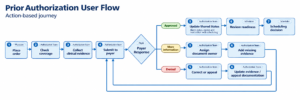
Figure 1. A complete prior authorization workflow connects payer responses to evidence owners and scheduling decisions.
Where is the exact failure point?
The failure point is the handoff between payer response and the hospital’s authorization or scheduling record. The portal may contain the answer, but the hospital may not convert it into a task, owner, deadline, and scheduling decision.
| Failure point | What goes wrong | Operational risk |
|---|---|---|
| Manual status copying | Staff transcribe portal updates | Stale or incorrect status |
| No evidence owner | Missing-document tasks move between teams | Aging authorization case |
| Dates not validated | Approval dates do not match procedure | Rescheduling or denial |
| Approved details ignored | Codes, units, provider, or site do not match | Claim denial or rework |
| Unclear denial handling | Denial reason is not structured for correction or appeal | More calls and resubmissions |
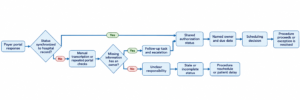
Figure 2. The failure-point path shows how missing synchronization and unclear ownership create scheduling risk.
What is the impact on hospitals?
Authorization teams repeat portal checks and submissions; scheduling requests updates; clinical teams may provide the same evidence more than once; patients may receive dates that later change.
The AMA’s 2024 physician survey reported that 94% of physicians saw care delays, 78% said authorization struggles can lead to treatment abandonment, and 93% reported a negative impact on clinical outcomes. These are physician-reported findings, not hospital cancellation rates. [1]
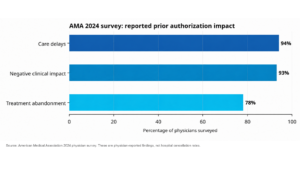
Figure 3. Physician-reported impact of prior authorization. The figures should not be presented as hospital performance metrics.
Manual tracking vs. automated status tracking
| Area | Manual or portal-only tracking | Automated status tracking |
|---|---|---|
| Visibility | Staff check portals and relay updates | Status changes appear in a shared case view |
| Evidence | Relies on memory and spreadsheets | Checklists and extraction flag missing or conflicting evidence |
| Ownership | Tasks may be informally assigned or lost | Each open item has an owner and due date |
| Scheduling risk | Often discovered near the procedure date | Risk flags appear earlier |
| Auditability | Records are scattered across systems | Submissions, responses, and actions are retained |
What do U.S. rules and standards mean for hospitals?
CMS-0057-F applies to specified Medicare Advantage, Medicaid, CHIP, and Federally Facilitated Exchange payers, requiring certain payers to maintain FHIR APIs. Operational requirements generally begin in 2026; several API requirements generally begin in 2027. Exact dates vary by payer type. [2]
X12 also supports established electronic prior authorization transactions. An interface helps only when the hospital also has structured evidence, clear ownership, exception handling, and scheduling rules. [3]
How can hospitals check prior authorization status?
Hospitals can check status through a payer portal, clearinghouse, API, phone, or fax. Record the status, source, verification date, authorization number, and next action in one shared case view.
Then validate approved codes, units, provider, site, authorization dates, and outstanding evidence before treating a procedure as scheduling-ready.
Who is responsible for prior authorization status follow-up?
Responsibility commonly involves patient access, authorization/UM, clinical teams, coding, and scheduling. Assign one accountable owner to every open task.
The owner should know what is missing, who will supply it, when it is due, and when scheduling must be alerted.
What documents are usually needed for prior authorization?
Payers may request clinical notes, diagnosis and procedure codes, test results, treatment history, forms, and the planned date of service.
A payer- and service-specific checklist distinguishes documents received, pending, and requiring clinical or coding review.
Implementation: Availity, Humana, and athenahealth
A 2023 implementation reported in the 2024 KLAS Points of Light case study shows how FHIR and X12 can connect provider and payer systems.
A. The problem being solved
Provider staff determine whether an order needs authorization, gather evidence, submit it through a payer-specific channel, and repeatedly check for a decision. EHRs and payer systems may use different technical languages: providers use FHIR clinical data, while payers may expect X12 278. [5]
Connectivity solves data exchange; Ysquare adds the hospital-side operational layer: turning payer responses and documents into owned, auditable scheduling-ready actions.
B. How the APIs work
The implementation uses three Da Vinci APIs. Coverage Requirements Discovery (CRD) sends patient, coverage, and service information from the EHR at ordering. It can indicate that no authorization is needed or identify requirements. [5][6]
Documentation Templates and Rules (DTR) supports payer-specific questionnaires and documentation collection, reducing manual copying of EHR data. [6]
Prior Authorization Support (PAS) packages the request and clinical data into a FHIR bundle. Availity converts it to Humana’s X12 278 workflow and returns the response in FHIR. FHIR is provider-facing; X12 278 is the payer-side administrative format. [5][6]
C. Measured implementation outcomes
Harmony Park Family Medicine saved 24 hours per week in manual work. Within a few months, 54% of monthly determinations required no authorization, and 70% of requests were instantly approved by Humana. These are collaborator-reported case-study metrics, not randomized-trial results. [5]
It reduces manual data translation and the need to contact payers just to establish whether authorization is required. [5][6]
Ysquare approach:
| Ysquare capability | What it adds |
|---|---|
| Evidence extraction | Reads orders, notes, payer checklists, codes, and portal responses. |
| Gap detection | Flags missing evidence, code conflicts, and invalid dates. |
| Status and task ownership | Assigns follow-up, missing-document, and appeal tasks to owners. |
| Scheduling alerts | Flags procedures approaching with unresolved authorization. |
| Audit trail | Preserves submissions, responses, decisions, and actions. |
Ysquare’s AI-powered document solution supports parsing, structured extraction, templates, filtering, and standardized reports. These capabilities could complement FHIR/X12 integrations after validation of connectivity, security, and human review. [4]
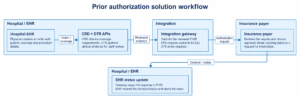
Figure 4. The solution workflow connects clinical evidence, payer review, and EHR status updates to close the authorization status gap.
Current approach for hospitals: Apply the Ysquare 5R Rules:
Connectivity and automation help hospitals exchange authorization data, but they do not by themselves solve delayed follow-up, missing evidence, unclear ownership, or scheduling risk. Ysquare recommends a practical operating framework:
| Rule | What it means | Hospital action |
|---|---|---|
| Right status | Every payer response becomes a current, shared status within 24 hours. | Update the authorization record from portal, API, fax, or phone responses; do not rely on manual status copying. |
| Right owner | Every open task has one accountable owner. | Assign a named owner for missing evidence, coding corrections, payer follow-up, appeals, and scheduling alerts. |
| Right evidence | Every request meets payer-specific completeness rules before submission. | Use a payer- and service-specific checklist to confirm notes, tests, codes, forms, provider, and site of service. |
| Right date | Authorization validity, approved codes, and procedure date must align. | Validate authorization start and expiration dates, approved CPT/HCPCS codes, units, provider, and site before scheduling. |
| Right escalation | Aging, denied, expired, or incomplete cases escalate automatically. | Trigger an alert when a case is pending too long, missing evidence, denied, expired, or approaching a procedure date without resolution. |
Which metrics should hospitals track?
| Metric | Why it matters |
|---|---|
| Order-to-decision time | Shows time from order to payer outcome. |
| First-pass completeness rate | Shows how often submissions avoid follow-up or resubmission. |
| Pending attachments by owner | Shows where missing evidence is aging. |
| Status freshness | Shows whether scheduling sees current information. |
| Avoidable reschedule rate | Shows authorization-related scheduling impact. |
| Rework per request | Shows duplicate portal checks, calls, and submissions. |
| Expiration risk | Prevents scheduling against soon-expiring authorizations. |


